Hot desking arrived in many Irish offices almost overnight. The layouts changed, but in a lot of cases the furniture didn't. A desk, chair and screen that once belonged to one person now have to fit whoever books them that day: tall, short, heavier or petite, and people with specific needs. This guide explains what that means for your legal duties, which standards actually matter, and how to set up shared desks that work for everyone.
Key takeaways
- Every user of a shared desk must be able to find a comfortable position. Furniture that suits the average person isn't enough.
- Buy to EN 1335 (chairs) and EN 527 (desks), certified in full, and aim for Type A chairs on shared desks.
- Monitor arms, sit-stand desks and easy-adjust chairs do most of the work in a hot desk environment.
- Training, maintenance and good data matter as much as the furniture itself.
Hot desking and agile working: what's the difference?
The two terms are often used interchangeably, but they aren't quite the same thing.
| Hot desking | Agile working | |
|---|---|---|
| What it is | Desks aren't assigned. Staff book or take any free desk. | A wider approach where people choose the space that suits the task: a desk, a quiet pod, a breakout area or home. |
| Main goal | Use desk space more efficiently. | Support different ways of working and better productivity. |
| Ergonomic challenge | One workstation has to fit many different people. | Every type of space, including home, has to be safe and suitable. |
In practice, most hybrid offices use both. That means the same principles apply across the whole space: furniture and equipment must be adaptable enough for everyone who uses them.
Does hot desking change your legal duties?
The duties themselves don't change, but meeting them gets harder. Under the Safety, Health and Welfare at Work (General Application) Regulations 2007 (Part 2, Chapter 5), employers must assess display screen equipment workstations and make sure they meet the minimum requirements in Schedule 4.
One line in Schedule 4 is the key to hot desking: the work chair must allow the user a comfortable position. On an assigned desk, that's one person. On a hot desk, it's every person who might sit there. A chair that suits someone of average height can be perfectly compliant for them and not compliant for a taller or shorter colleague the next day.
The Health and Safety Authority has advised KOS that it would expect a higher specification of equipment where desks are shared. It has also indicated that where a workplace is uniform, the equipment is adjustable enough for the range of people using it and there's a safe system of work, one assessment for each premises can be sufficient, rather than a new assessment every time someone changes desk.
If you'd like a refresher on what a full assessment involves, see our guide to DSE assessments.
One set of furniture, every shape and size
The biggest challenge in a shared office is simple: you're looking for one set of furniture that suits a whole working population. A fixed-height monitor shows why. For a shorter person it might be perfect. For a taller person it's too low, so they need a stand. On an assigned desk, that's a one-off fix. On a hot desk, it means moving the stand in and out every day.
We've seen this go wrong at scale. One office was fitted out to a very high specification, with large curved screens weighing around 12kg each, but the screens didn't adjust in height. Monitor stands were added for taller staff. In practice, that meant someone lifting a 12kg screen with one arm every morning to slide a stand underneath, and lifting it out again every evening. A monitor arm would have avoided the problem entirely.
The standards that matter when you buy
European standards aren't a legal requirement in themselves, but they're the only impartial test of quality and adjustability. Without them, you're relying on marketing.
| Equipment | Standard | What to look for on shared desks |
|---|---|---|
| Office chairs | EN 1335 Parts 1 and 2 | Part 1 covers dimensions and adjustability; Part 2 covers safety, stability and durability. Look for certification to both. Aim for Type A on shared chairs. Type C chairs only need 80mm of seat height adjustment, so they fit far fewer people. |
| Sit-stand desks | EN 527 | A height range of 650mm to 1250mm to suit the working population. We'd also look for a dynamic load capacity of at least 120kg. |
| Screens | Schedule 4 | The screen must swivel and tilt easily and freely for every user. On shared desks, that's very hard to achieve without monitor arms. |
| Acoustic pods | ISO 23351-1 | Class A sound reduction, plus ventilation of at least 20 litres per second (72m³ per hour) for comfort and air quality. |
A standard is a baseline, not a guarantee of comfort. EN 1335 tells you a chair is adjustable enough and built to a reasonable quality. It doesn't tell you how comfortable it is, how good the lumbar support feels or how easy the controls are to use. That's why you still need to try the chair. Our chair buying guide and desk buying guide go into more detail.
Red flags in supplier claims
- “Designed to” or “tested to” EN 1335. Did it pass? Ask for the certificate.
- Certified to Part 1 only. The chair may adjust well but hasn't passed safety and durability testing.
- No back height adjustment. Schedule 4 requires the seat back to adjust in height and tilt. A fixed backrest doesn't meet Irish minimum requirements, even on a premium chair.
- “Fits 95% of people.” Ask what that's based on. Checked against real body measurement data, claims like this often turn out to be closer to 60%.
- Asterisks on test certificates. They often mean a requirement wasn't fully met.
- Warranties longer than the manufacturer's. Check who actually stands behind the product.
What every hot desk needs
An easy-adjust chair, built to last
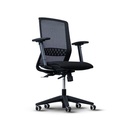
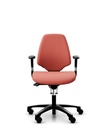
A chair on an assigned desk might be set up once and left for years. A hot-desk chair can be adjusted every working day, which adds up to thousands of adjustments over its life. The moving parts are where chairs break, so build quality matters even more on shared chairs. Simple, intuitive controls matter too: the easier a chair is to adjust, the more likely people are to adjust it.
A sit-stand desk
A height-adjustable desk lets shorter and taller people set the right working height for themselves, sitting or standing. That also means fewer footrests to manage across a floor.
A monitor arm
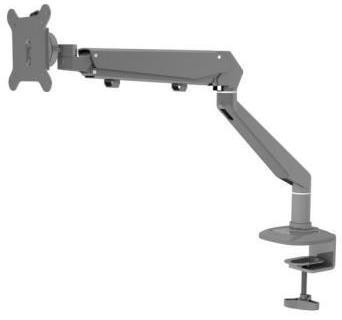
Monitor arms are the most practical way to give every user the right screen height and angle. They also clear the desk surface, which makes cleaning between users quicker. Check the arm can take the weight of your screens, and that the screens have VESA mounting.
Plug and play
People want to sit down and start working. A single USB-C connection for power, screens, keyboard and mouse removes a daily frustration, and some monitor arms now have docking built in.
Neighbourhoods for different needs
If a team needs extra or larger screens, group them into a neighbourhood rather than kitting out every desk to the highest specification.
Keeping shared furniture working
- Set a maintenance schedule. On a hot desk, nobody owns the chair, so broken equipment tends to get passed around rather than reported. Plan repairs while equipment is still under warranty.
- Train people to set up their workstation. One organisation we spoke to had its DSE records fully up to date but failed an ISO 45001 audit because staff weren't adjusting their equipment to suit themselves. A short group workshop, followed by checking people can set up their own space, closes that gap. Many organisations build this capability in-house through DSE assessor training.
- Plan for people with specific needs. Where standard furniture can't meet someone's needs, a reasonable accommodation such as an assigned chair or desk may be required. A workplace needs assessment identifies exactly what will help.
- Keep records in one place. DSE management software tracks assessments, recommendations and equipment through to sign-off.
Beyond the desk: acoustics, lighting and quiet space
With more video calls taken at desks, acoustics have become a bigger issue in open-plan offices. If you're adding desk screens, choose acoustic ones. Quiet spaces and well-ventilated pods give people somewhere to focus or take a call. Lighting matters too: bright, harsh overhead LED lighting can cause discomfort, and some people, including some neurodivergent colleagues, are particularly sensitive to it. Offering a mix of spaces, including movement-friendly options like active seating, helps everyone find a way of working that suits them.
Your action plan
- Check your standard furniture range. Does every chair, desk and pod you buy meet the relevant EN or ISO standard, certified in full?
- Look at your data. Desk booking and occupancy data show which spaces are busy, which are avoided, and why.
- Find the gaps. Heights, builds and specific needs your current furniture doesn't cover.
- Get everyone in the room. Run a short workshop with health and safety, HR, facilities, IT, finance and purchasing to agree your equipment standards.
- Buy objectively. Use the standards as your baseline, then test comfort and ease of use. Don't be swayed by marketing.
Frequently asked questions
Do I need to carry out a DSE assessment every time someone uses a different hot desk?
Not necessarily. The HSA has indicated that where workstations are uniform, the equipment is adjustable enough for the range of people using it and there's a safe system of work, one assessment for each premises can be sufficient. Staff still need to know how to set up their own workstation.
What type of office chair is best for hot desking?
A chair certified to both parts of EN 1335, ideally Type A, with simple controls and strong build quality. Type A chairs have a wider range of adjustment, so they fit more of your people.
Are monitor arms necessary for hot desks?
Schedule 4 requires every user to be able to swivel and tilt the screen to suit them. On a shared desk, monitor arms are usually the only practical way to give everyone the right height and angle.
What standard should a sit-stand desk meet?
EN 527, with a height range from 650mm to 1250mm. We'd also recommend a dynamic load capacity of at least 120kg.
Not sure your office is ready for agile working?
Send us your current furniture specification or floor plan. Our team will review it against the standards and talk you through the gaps and what to prioritise, with no obligation.
Book a ConsultationHow KOS can help


Hot desking arrived in many Irish offices almost overnight. The layouts changed, but in a lot of cases the furniture didn't. A desk, chair and screen that once belonged to one person now have to fit whoever books them that day: tall, short, heavier or petite, and people with specific needs. This guide explains what that means for your legal duties, which standards actually matter, and how to set up shared desks that work for everyone.
Key takeaways
- Every user of a shared desk must be able to find a comfortable position. Furniture that suits the average person isn't enough.
- Buy to EN 1335 (chairs) and EN 527 (desks), certified in full, and aim for Type A chairs on shared desks.
- Monitor arms, sit-stand desks and easy-adjust chairs do most of the work in a hot desk environment.
- Training, maintenance and good data matter as much as the furniture itself.
Hot desking and agile working: what's the difference?
The two terms are often used interchangeably, but they aren't quite the same thing.
| Hot desking | Agile working | |
|---|---|---|
| What it is | Desks aren't assigned. Staff book or take any free desk. | A wider approach where people choose the space that suits the task: a desk, a quiet pod, a breakout area or home. |
| Main goal | Use desk space more efficiently. | Support different ways of working and better productivity. |
| Ergonomic challenge | One workstation has to fit many different people. | Every type of space, including home, has to be safe and suitable. |
In practice, most hybrid offices use both. That means the same principles apply across the whole space: furniture and equipment must be adaptable enough for everyone who uses them.
Does hot desking change your legal duties?
The duties themselves don't change, but meeting them gets harder. Under the Safety, Health and Welfare at Work (General Application) Regulations 2007 (Part 2, Chapter 5), employers must assess display screen equipment workstations and make sure they meet the minimum requirements in Schedule 4.
One line in Schedule 4 is the key to hot desking: the work chair must allow the user a comfortable position. On an assigned desk, that's one person. On a hot desk, it's every person who might sit there. A chair that suits someone of average height can be perfectly compliant for them and not compliant for a taller or shorter colleague the next day.
The Health and Safety Authority has advised KOS that it would expect a higher specification of equipment where desks are shared. It has also indicated that where a workplace is uniform, the equipment is adjustable enough for the range of people using it and there's a safe system of work, one assessment for each premises can be sufficient, rather than a new assessment every time someone changes desk.
If you'd like a refresher on what a full assessment involves, see our guide to DSE assessments.
One set of furniture, every shape and size
The biggest challenge in a shared office is simple: you're looking for one set of furniture that suits a whole working population. A fixed-height monitor shows why. For a shorter person it might be perfect. For a taller person it's too low, so they need a stand. On an assigned desk, that's a one-off fix. On a hot desk, it means moving the stand in and out every day.
We've seen this go wrong at scale. One office was fitted out to a very high specification, with large curved screens weighing around 12kg each, but the screens didn't adjust in height. Monitor stands were added for taller staff. In practice, that meant someone lifting a 12kg screen with one arm every morning to slide a stand underneath, and lifting it out again every evening. A monitor arm would have avoided the problem entirely.
The standards that matter when you buy
European standards aren't a legal requirement in themselves, but they're the only impartial test of quality and adjustability. Without them, you're relying on marketing.
| Equipment | Standard | What to look for on shared desks |
|---|---|---|
| Office chairs | EN 1335 Parts 1 and 2 | Part 1 covers dimensions and adjustability; Part 2 covers safety, stability and durability. Look for certification to both. Aim for Type A on shared chairs. Type C chairs only need 80mm of seat height adjustment, so they fit far fewer people. |
| Sit-stand desks | EN 527 | A height range of 650mm to 1250mm to suit the working population. We'd also look for a dynamic load capacity of at least 120kg. |
| Screens | Schedule 4 | The screen must swivel and tilt easily and freely for every user. On shared desks, that's very hard to achieve without monitor arms. |
| Acoustic pods | ISO 23351-1 | Class A sound reduction, plus ventilation of at least 20 litres per second (72m³ per hour) for comfort and air quality. |
A standard is a baseline, not a guarantee of comfort. EN 1335 tells you a chair is adjustable enough and built to a reasonable quality. It doesn't tell you how comfortable it is, how good the lumbar support feels or how easy the controls are to use. That's why you still need to try the chair. Our chair buying guide and desk buying guide go into more detail.
Red flags in supplier claims
- “Designed to” or “tested to” EN 1335. Did it pass? Ask for the certificate.
- Certified to Part 1 only. The chair may adjust well but hasn't passed safety and durability testing.
- No back height adjustment. Schedule 4 requires the seat back to adjust in height and tilt. A fixed backrest doesn't meet Irish minimum requirements, even on a premium chair.
- “Fits 95% of people.” Ask what that's based on. Checked against real body measurement data, claims like this often turn out to be closer to 60%.
- Asterisks on test certificates. They often mean a requirement wasn't fully met.
- Warranties longer than the manufacturer's. Check who actually stands behind the product.
What every hot desk needs
An easy-adjust chair, built to last
A chair on an assigned desk might be set up once and left for years. A hot-desk chair can be adjusted every working day, which adds up to thousands of adjustments over its life. The moving parts are where chairs break, so build quality matters even more on shared chairs. Simple, intuitive controls matter too: the easier a chair is to adjust, the more likely people are to adjust it.
A sit-stand desk
A height-adjustable desk lets shorter and taller people set the right working height for themselves, sitting or standing. That also means fewer footrests to manage across a floor.
A monitor arm
Monitor arms are the most practical way to give every user the right screen height and angle. They also clear the desk surface, which makes cleaning between users quicker. Check the arm can take the weight of your screens, and that the screens have VESA mounting.
Plug and play
People want to sit down and start working. A single USB-C connection for power, screens, keyboard and mouse removes a daily frustration, and some monitor arms now have docking built in.
Neighbourhoods for different needs
If a team needs extra or larger screens, group them into a neighbourhood rather than kitting out every desk to the highest specification.
Keeping shared furniture working
- Set a maintenance schedule. On a hot desk, nobody owns the chair, so broken equipment tends to get passed around rather than reported. Plan repairs while equipment is still under warranty.
- Train people to set up their workstation. One organisation we spoke to had its DSE records fully up to date but failed an ISO 45001 audit because staff weren't adjusting their equipment to suit themselves. A short group workshop, followed by checking people can set up their own space, closes that gap. Many organisations build this capability in-house through DSE assessor training.
- Plan for people with specific needs. Where standard furniture can't meet someone's needs, a reasonable accommodation such as an assigned chair or desk may be required. A workplace needs assessment identifies exactly what will help.
- Keep records in one place. DSE management software tracks assessments, recommendations and equipment through to sign-off.
Beyond the desk: acoustics, lighting and quiet space
With more video calls taken at desks, acoustics have become a bigger issue in open-plan offices. If you're adding desk screens, choose acoustic ones. Quiet spaces and well-ventilated pods give people somewhere to focus or take a call. Lighting matters too: bright, harsh overhead LED lighting can cause discomfort, and some people, including some neurodivergent colleagues, are particularly sensitive to it. Offering a mix of spaces, including movement-friendly options like active seating, helps everyone find a way of working that suits them.
Your action plan
- Check your standard furniture range. Does every chair, desk and pod you buy meet the relevant EN or ISO standard, certified in full?
- Look at your data. Desk booking and occupancy data show which spaces are busy, which are avoided, and why.
- Find the gaps. Heights, builds and specific needs your current furniture doesn't cover.
- Get everyone in the room. Run a short workshop with health and safety, HR, facilities, IT, finance and purchasing to agree your equipment standards.
- Buy objectively. Use the standards as your baseline, then test comfort and ease of use. Don't be swayed by marketing.
Frequently asked questions
Do I need to carry out a DSE assessment every time someone uses a different hot desk?
Not necessarily. The HSA has indicated that where workstations are uniform, the equipment is adjustable enough for the range of people using it and there's a safe system of work, one assessment for each premises can be sufficient. Staff still need to know how to set up their own workstation.
What type of office chair is best for hot desking?
A chair certified to both parts of EN 1335, ideally Type A, with simple controls and strong build quality. Type A chairs have a wider range of adjustment, so they fit more of your people.
Are monitor arms necessary for hot desks?
Schedule 4 requires every user to be able to swivel and tilt the screen to suit them. On a shared desk, monitor arms are usually the only practical way to give everyone the right height and angle.
What standard should a sit-stand desk meet?
EN 527, with a height range from 650mm to 1250mm. We'd also recommend a dynamic load capacity of at least 120kg.
Not sure your office is ready for agile working?
Send us your current furniture specification or floor plan. Our team will review it against the standards and talk you through the gaps and what to prioritise, with no obligation.
Book a ConsultationHow KOS can help

 and then Add to Home Screen.