Choosing EHS software in 2027 isn't about finding the platform with the longest feature list. Almost every EHS system on the market covers incident reporting, audits and a compliance dashboard. The real differences show up in the risks that don't fit neatly into a form, and for most organisations that means ergonomics. Workstation set-ups, home working and hybrid desks are some of the most common sources of musculoskeletal discomfort, and they're the area where many EHS platforms are thinnest.
This guide compares the main EHS and ergonomic risk assessment options available to organisations in Ireland and the UK, explains how to judge them, and gives you a set of demo questions to bring to any vendor, including us.
The short answer
- Choose KOS Ergonomic Management Software if you want DSE and ergonomic risk assessments handled properly, from training and self-assessment through to competent-person sign-off, either on its own or alongside your existing EHS system.
- Consider Usafety if you'd prefer every employee to have a booked, assessor-led assessment.
- Look at iHasco or BeOnline &Learn if ergonomics is one part of a wider health and safety eLearning programme.
- Look at Vitrue Health if AI-driven posture and musculoskeletal analysis is your main priority.
- Look at Healthy Working, Workhappy or VergoUK if your workforce is mainly UK-based and you want an established self-assessment provider.
- Add a full EHS suite if you also need incident management, permits to work, contractor control or chemical safety. Those sit outside what the platforms in this guide are built for.
We make ergonomic management software ourselves, so we've been clear about where our platform fits and where it doesn't. Every organisation's needs are different, and the right choice depends on how risk actually shows up in yours.
What Makes the Best EHS Software in 2027?
EHS software (environment, health and safety, sometimes called HSE or health and safety software) exists to help you meet legal duties and keep evidence that you've met them. In Ireland, the Safety, Health and Welfare at Work Act 2005 requires employers to identify hazards and assess risks. For people who work at screens, the Safety, Health and Welfare at Work (General Application) Regulations 2007, Part 2, Chapter 5 adds specific workstation requirements. In the UK, the equivalent is the Health and Safety (Display Screen Equipment) Regulations 1992.
Software alone doesn't satisfy any of these. A risk assessment needs competent oversight, and identified risks need to be acted on. So the best EHS software isn't the one with the most modules. It's the one that closes the loop between a flagged risk and a resolved one, across every type of risk you actually have.
Why Feature Lists Mislead
On a vendor comparison sheet, "risk assessment", "reporting" and "mobile app" will be ticked for almost everyone. What the ticks don't tell you is:
- Whether the ergonomic risk assessment is a generic form, or a process that trains employees, triages risk and gets cases reviewed.
- Whether high-risk cases rise to the top automatically, or sit in a long list waiting for someone to read them.
- Whether a competent person reviews and signs off each case, or the automated score is treated as the final word.
- Whether recommended equipment is tracked through to delivery, or the trail goes cold once a recommendation is made.
- Whether home and hybrid workers are covered by the same process as people in the office.
How to Evaluate EHS Software: Six Questions That Matter
Use these six lenses to separate platforms that manage risk from those that simply record it.
| Lens | The real question to ask |
|---|---|
| Scope of EHS coverage | Which risks does it cover: incidents, audits, contractors, chemicals, permits, ergonomics? Which do you actually need? |
| Ergonomic and DSE risk depth | Is the workstation assessment a tick-box form, or does it train, score and prioritise risk? |
| Competent-person review | Is there a clear step where a competent person reviews, adds notes and signs off each case? |
| Action follow-through | Are corrective actions and equipment purchases tracked until they're closed? |
| Office, home and hybrid | Does the same process work for someone at a dining table as well as in the office? |
| Audit-ready evidence | Could you show an HSA or HSE inspector the full history of a case in a few clicks? |
KOS Ergonomic Management Software: Where It's Strong and Where It Isn't
KOS Ergonomic Management Software is built to look after the display screen equipment (DSE) side of your EHS programme, and the ergonomic risk assessments that go with it, in one place: training, self-assessment, triage, review, equipment and sign-off. It's backed by KOS Ergonomics, which has assessed over 100,000 workspaces for organisations from start-ups to global enterprises.
Where KOS Is Strong
- Training before assessment. Employees complete short 3D animated training tailored to the set-up they actually use (office, home or hybrid), with materials they can return to. They assess their workstation already knowing what good looks like.
- Adjust as you assess. The self-assessment prompts people to make changes as they answer, so many issues are fixed on the spot and never reach your team's queue.
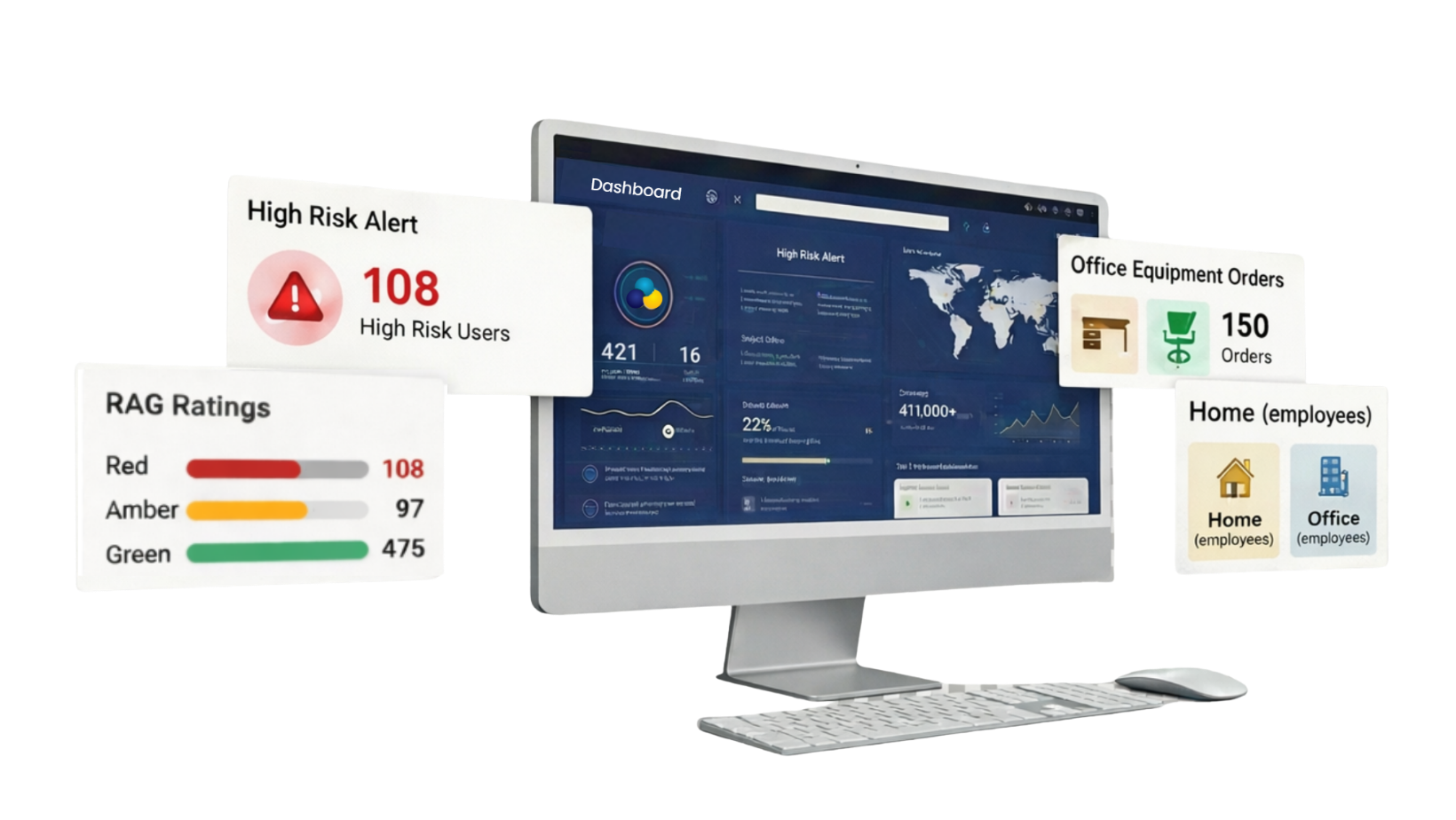
- RAG triage with competent-person sign-off. Every assessment is scored red, amber or green automatically. Flagged cases are reviewed and annotated by a competent person, who escalates high-risk employees and signs off each case digitally once actions are closed.
- Equipment only where it's needed. Recommended ergonomic equipment is linked to assessment findings and tracked to delivery, which keeps spend targeted.
- One management hub. See completion by team and site, risk by department, recurring issues, equipment needs and a full audit trail from one dashboard, with exports you can feed into your wider EHS reporting.
- Clinical backing. For complex cases, your team has access to qualified physiotherapists and occupational therapists, and KOS can also carry out in-person or remote DSE assessments where a self-assessment isn't enough.
- Security and rollout. The platform is ISO 27001 certified and GDPR compliant, with data stored in the EU. There's nothing to install: staff start from a simple link.
- Works alongside your EHS system. It doesn't ask you to replace what you already have. It fills the ergonomic gap that general EHS platforms tend to leave.
The platform is easiest to understand by seeing it. These previews use sample data to show what employees and your competent person see at each stage.
How a KOS Assessment Moves From Training to Sign-Off
Click through the six steps to see what the employee and the competent person see at each stage.
-
Employees complete short DSE awareness training, with course materials they can go back to anytime, so they know how to set up their workstation before they assess it.
-
With training done, staff complete a guided DSE workstation assessment at their own desk, in the office or at home. No appointments and no paper forms.
-
Every assessment is scored red, amber or green automatically, so your highest-risk employees rise to the top instead of waiting in a queue.
-
Flagged assessments are reviewed by a competent person, who adds notes and escalates high-risk cases for follow-up.
-
Recommended ergonomic equipment is purchased only where it's needed, and every corrective action is tracked until it's closed.
-
Once actions are complete, the competent person, such as your health and safety manager, signs the assessment off with a digital signature. Every signed record is stored in one place, ready for an HSA inspection or internal audit.
Behind the assessments sits a management hub for the people running the programme.
Reporting, Action Plans and Alerts in One Management Hub
Running assessments across a whole workforce usually means spreadsheets and reminder emails. Open each card to see how the hub takes on the admin.
See risk by department, site or location at a glance. Spot recurring issues, see what equipment is really needed and plan budgets on real data instead of guesswork.
- Live completion counter
- Risk trends by team
- Equipment needs at a glance
- Automated report generator
Every assessment creates its own action plan from the employee's answers. Actions are closed off as they're dealt with, building a complete audit trail without extra paperwork.
- Instant feedback for employees
- Issue tracking to close
- Management notes on every case
- Status exports on demand
Automated launch and reminder emails keep completion rates high without anyone chasing by hand, and high-risk notifications go straight to the right person.
- Custom launch emails
- Automatic reminders
- High-risk notifications
- No manual follow-up
Previews are illustrative and use sample data and names.
Where KOS Isn't the Right Fit
- You need a full EHS suite. KOS is a specialist platform. If you need incident management, permits to work, chemical safety or contractor management, you'll need a broader EHS system, and KOS would sit alongside it for DSE and workstation ergonomics.
- Your main risk is industrial ergonomics. The software is designed for office, home and hybrid workstations, not manual handling, repetitive production-line tasks or lifting analysis.
- You want an assessor to see every single employee. KOS uses a trained self-assessment model with expert review of flagged cases. If your policy is a one-to-one assessor visit for everyone, a booked assessment service may suit you better, though KOS provides that separately too.
Best EHS Software 2027: The Main Platforms Compared
The platforms below are the main options organisations in Ireland and the UK tend to shortlist for DSE and ergonomic risk management, either on their own or as the ergonomics layer of a wider EHS programme. They take noticeably different approaches, which is why comparing them on a single feature list rarely works.
| Platform | Best for | Approach | Worth checking in a demo |
|---|---|---|---|
| KOS Ergonomic Management Software | Organisations wanting ergonomic and DSE risk handled from training to sign-off, with clinical backup | Trained self-assessment, RAG triage, competent-person sign-off, equipment tracking | Fit with your existing EHS system if you have one |
| Usafety | Organisations wanting assessor-led assessments for every employee | Booking, assessor-led workstation reviews and action tracking | How it scales for large or dispersed workforces |
| Healthy Working (available via Posture Group) | UK organisations wanting a long-established self-assessment tool | Online self-assessment with risk prioritisation | How it maps to Irish regulations if you employ staff in Ireland |
| iHasco | Organisations already using iHasco for wider H&S eLearning | IOSH-approved DSE course with an online assessment tool | Depth of case management, review and sign-off |
| Vitrue Health | Organisations prioritising AI-driven posture and MSK insight | AI-powered video assessments and ergonomic analysis | Competent-person review workflow and Irish compliance fit |
| Workhappy | UK organisations wanting software plus a fully managed service | Self-assessment platform with invites, reminders and managed DSE service | Coverage outside the UK |
| VergoUK (VergoPro) | UK businesses of any size wanting per-employee licences | Online self-assessment, reminders, training library, escalation to in-depth assessment | Equipment follow-through and sign-off records |
| BeOnline &Learn | Organisations wanting ergonomics inside a configurable LMS | DSE training and risk assessment within a broader learning platform | Set-up and configuration effort |
Information on other providers is based on their publicly available product information. Features change, so check current details with each vendor directly.
Where Full EHS Suites Fit
Large EHS suites, such as EcoOnline, VelocityEHS, Intelex and Cority, are built to run the whole health and safety function: incidents, audits, contractors, chemicals and permits to work. If you need that breadth, you'll want one of them, and none of the platforms above is trying to replace it.
The catch is that ergonomic risk assessment is often a form inside a much bigger system, rather than a process in its own right. That's why many organisations pair a full suite with a specialist platform for DSE, and use exports from the specialist tool to feed their wider compliance reporting.
Usafety
Usafety is an Irish workplace safety provider established in 1995, offering DSE software alongside its assessment and training services. Its platform is built around connecting employee booking, assessor-led assessment records and recommended actions, with onboarding to agree reporting and follow-up workflows.
Where it performs well
If your preference is for a competent assessor to review every workstation directly, rather than relying on self-assessment, Usafety's model is designed around exactly that, with the software coordinating bookings and records.
Worth checking
An assessor-led model gives depth, but it's worth asking how it performs at scale, for example with several hundred hybrid workers across multiple sites, and how quickly assessments can be relaunched when set-ups change.
Healthy Working
Healthy Working is one of the longer-established DSE self-assessment tools in the UK, and is offered through providers including Posture Group. It focuses on online self-assessment with employee risk prioritisation, so issues are easy for your team to identify.
Where it performs well
Its maturity is a strength. It's been used widely by UK organisations, particularly for managing large homeworking populations.
Worth checking
If you employ people in Ireland, ask how the assessment and reporting reflect the Irish 2007 Regulations rather than UK legislation, and who carries out the competent-person review.
iHasco
iHasco is a UK health and safety eLearning provider. Its IOSH-approved DSE training course includes an online DSE assessment tool that lets staff self-assess their workstation and report issues to their employer.
Where it performs well
If your organisation already runs iHasco courses for fire safety, manual handling and other compliance training, keeping DSE in the same place is convenient, and the IOSH approval gives the training recognised credibility.
Worth checking
Because the product is training-led, ask how much case management sits behind the assessment tool: risk triage, competent-person review, action tracking and sign-off.
Vitrue Health
Vitrue Health offers AI-powered DSE assessments, including self-assessments, risk templates and ergonomic analysis, with a strong focus on reducing musculoskeletal pain.
Where it performs well
For organisations that see ergonomics primarily as part of an MSK and wellbeing strategy, the video-based, interactive approach is engaging for employees and generates useful posture insight.
Worth checking
Ask how the AI output feeds into a competent-person review and sign-off, and how the platform supports compliance with Irish regulations as well as UK ones.
Workhappy
Workhappy provides DSE self-assessment software covering invites, reminders, training, self-management of low-risk issues and record keeping, alongside a fully managed DSE service.
Where it performs well
For UK organisations that want to hand the whole programme to a provider rather than run it in-house, the managed service option reduces the internal workload significantly.
Worth checking
The service is positioned around UK legislation, so confirm coverage and compliance fit if you have staff in Ireland or elsewhere.
VergoUK (VergoPro)
VergoUK offers online DSE assessments through its VergoPro platform, with individual employee licences, step-by-step assessments, automatic reminders, a training library and a reporting suite. High-risk employees can be escalated to a more in-depth assessment.
Where it performs well
The per-employee licence model and escalation path make it accessible for small businesses as well as large organisations.
Worth checking
Ask how equipment recommendations and corrective actions are tracked to completion, and what the sign-off record looks like.
BeOnline &Learn
BeOnline &Learn is a configurable learning management system with integrated DSE workstation training and risk assessment, covering office, home and hybrid workstations, equipment ordering and scheduling of virtual or onsite assessments. It's listed on the UK government's G-Cloud framework.
Where it performs well
Organisations that want ergonomics as one module inside a wider, configurable H&S learning platform, including their own SCORM courses, will find it flexible.
Worth checking
Configurability usually means more set-up. Ask how long a typical rollout takes and how much administration it needs day to day.
Which EHS Software Should You Shortlist?
There's no universal answer, but your shortlist should follow how risk shows up in your organisation.
| If your priority is… | Shortlist |
|---|---|
| Proper DSE and ergonomic risk management, from training to signed-off record, with expert backup for complex cases | KOS Ergonomic Management Software |
| An assessor-led assessment for every employee | Usafety, or KOS's in-person and remote assessment services |
| Ergonomics inside a wider H&S eLearning programme | iHasco, BeOnline &Learn |
| AI-driven posture and MSK insight | Vitrue Health |
| A UK-focused self-assessment tool or managed service | Healthy Working, Workhappy, VergoUK |
| Incidents, permits, contractors and chemicals in one system | A full EHS suite, paired with a specialist ergonomics platform such as KOS |
The Demo Script: Questions That Expose Real Capability
Don't let a vendor lead the demo with their strongest screens. Bring these scenarios instead.
Ergonomic risk and triage
- A home worker reports neck pain and is working from a laptop at the kitchen table. Show me exactly what happens next, and who sees it.
- We have 400 submissions this week. How do I find the ten that need attention today?
Competent-person review
- Who reviews flagged assessments: our staff, your staff or the software?
- Show me a completed sign-off record, including who signed it and when.
- If we don't have a competent person in-house, what are our options?
Actions and equipment
- Show me an equipment recommendation being tracked from assessment to delivery to closure.
- How do we stop equipment being bought where there's no assessed need?
Fit with your wider EHS system
- What can we export, and in what format, to feed our existing EHS reporting?
- Does anyone need to log in to two systems to see the full picture of a case?
Evidence and compliance
- An inspector asks for the ergonomic assessment history of one employee over the last two years. Show me how long that takes.
- Which regulations is the assessment built around, and how does it handle employees in Ireland and the UK?
- Where is our employees' data stored, and which security certifications do you hold?
Why EHS Software Rollouts Fail
Picking the right platform is only half the job. These are the most common reasons EHS and ergonomic risk software doesn't deliver:
- No one owns the review step. The software flags risk, but no competent person is assigned to act on it. Before launch, decide who reviews and signs off, and make sure they're trained. Our DSE assessor training course is designed for exactly this.
- Treating the score as the assessment. An automated red, amber or green result is a triage tool, not a completed risk assessment.
- Assuming the EHS suite covers ergonomics. A form in the system isn't the same as a process that trains, triages, reviews and signs off.
- Launching without a plan for equipment. If recommendations have no budget or ordering route, employees quickly stop believing the process leads anywhere.
- One-off launches. Set-ups change, especially with hybrid working. Plan for reassessment when people move, change role or report discomfort.
If you're still deciding whether to run your programme in-house or bring in outside help, our free guide, Internal vs External DSE Assessor Models, walks through the trade-offs. And if you're not sure what a good assessment involves, start with What Is a DSE Assessment? A Practical Guide for Employers.
The EHS Software Decision That Matters Most
Every platform in this guide can capture a risk assessment. What separates them is what happens next. The right question to ask isn't "does it have a risk assessment module?" but "does it get flagged risks reviewed, fixed and signed off, with a record I can stand over?"
If you already run a wider health and safety platform and want to understand where a specialist tool fits, read our guide on DSE software vs EHS software. If DSE is your main concern, our guide to the best DSE software goes into more depth on the specialist options.
Get a Free 30-Day Trial of KOS Ergonomic Management Software
Try the platform free for 30 days, with no obligation and nothing to install. See how training, self-assessment, risk triage and competent-person sign-off work for your own people, and how the DSE and ergonomic side of your EHS programme can run without chasing spreadsheets. Prefer a walkthrough first? We'll show you the full workflow using scenarios from your own organisation.
Get a Free 30-Day Trial Book a DemoFAQs
What is the best EHS software in 2027?
It depends on which risks you need to manage. For a full health and safety function covering incidents, audits, contractors and chemicals, you'll want a full EHS suite. For DSE and ergonomic risk assessments, with training, risk triage, competent-person sign-off and equipment tracking in one platform, KOS Ergonomic Management Software is a strong choice, either on its own or alongside your EHS system. For assessor-led assessments, Usafety is worth a look, and for AI-led MSK analysis, Vitrue Health.
What is EHS software?
EHS software helps organisations manage environment, health and safety risk and compliance. Depending on the platform, it can cover incident reporting, audits and inspections, risk assessments, contractor management, chemical safety and reporting. Specialist tools, such as DSE and ergonomic risk assessment software, cover one area in more depth.
Does EHS software cover ergonomic risk assessments?
Many EHS platforms include a workstation or ergonomic assessment, but often as a form rather than a full process. Ask whether employees are trained first, whether high-risk cases are triaged automatically, whether a competent person reviews and signs off each case, and whether equipment is tracked to delivery.
Is HSE software the same as EHS software?
For most buyers, yes. HSE (health, safety and environment) and EHS (environment, health and safety) describe the same type of software, and the two terms are used interchangeably by vendors. The Health and Safety Authority and the UK's Health and Safety Executive are separate bodies, so check which regulator's rules the platform is built around.
Does EHS software make us compliant?
No software makes you compliant on its own. Under both Irish and UK regulations, risk assessments need competent oversight and identified risks must be acted on. Good EHS software supports and evidences that process, but someone competent still needs to review and sign off.
Do we need separate software for DSE if we already have an EHS system?
Not always, but it's worth checking how deep your current system goes. If your EHS platform treats the workstation assessment as a form with no triage, review or sign-off, a specialist DSE platform can fill that gap. Many organisations run both, using exports from the specialist tool to feed wider compliance reporting.
Does KOS offer a free trial?
Yes. KOS Ergonomic Management Software comes with a free 30-day trial, with no obligation and no set-up required. Pricing after the trial is tailored to your organisation, and you can request a quote or book a demo to talk it through.
Choosing EHS software in 2027 isn't about finding the platform with the longest feature list. Almost every EHS system on the market covers incident reporting, audits and a compliance dashboard. The real differences show up in the risks that don't fit neatly into a form, and for most organisations that means ergonomics. Workstation set-ups, home working and hybrid desks are some of the most common sources of musculoskeletal discomfort, and they're the area where many EHS platforms are thinnest.
This guide compares the main EHS and ergonomic risk assessment options available to organisations in Ireland and the UK, explains how to judge them, and gives you a set of demo questions to bring to any vendor, including us.
The short answer
- Choose KOS Ergonomic Management Software if you want DSE and ergonomic risk assessments handled properly, from training and self-assessment through to competent-person sign-off, either on its own or alongside your existing EHS system.
- Consider Usafety if you'd prefer every employee to have a booked, assessor-led assessment.
- Look at iHasco or BeOnline &Learn if ergonomics is one part of a wider health and safety eLearning programme.
- Look at Vitrue Health if AI-driven posture and musculoskeletal analysis is your main priority.
- Look at Healthy Working, Workhappy or VergoUK if your workforce is mainly UK-based and you want an established self-assessment provider.
- Add a full EHS suite if you also need incident management, permits to work, contractor control or chemical safety. Those sit outside what the platforms in this guide are built for.
We make ergonomic management software ourselves, so we've been clear about where our platform fits and where it doesn't. Every organisation's needs are different, and the right choice depends on how risk actually shows up in yours.
What Makes the Best EHS Software in 2027?
EHS software (environment, health and safety, sometimes called HSE or health and safety software) exists to help you meet legal duties and keep evidence that you've met them. In Ireland, the Safety, Health and Welfare at Work Act 2005 requires employers to identify hazards and assess risks. For people who work at screens, the Safety, Health and Welfare at Work (General Application) Regulations 2007, Part 2, Chapter 5 adds specific workstation requirements. In the UK, the equivalent is the Health and Safety (Display Screen Equipment) Regulations 1992.
Software alone doesn't satisfy any of these. A risk assessment needs competent oversight, and identified risks need to be acted on. So the best EHS software isn't the one with the most modules. It's the one that closes the loop between a flagged risk and a resolved one, across every type of risk you actually have.
Why Feature Lists Mislead
On a vendor comparison sheet, "risk assessment", "reporting" and "mobile app" will be ticked for almost everyone. What the ticks don't tell you is:
- Whether the ergonomic risk assessment is a generic form, or a process that trains employees, triages risk and gets cases reviewed.
- Whether high-risk cases rise to the top automatically, or sit in a long list waiting for someone to read them.
- Whether a competent person reviews and signs off each case, or the automated score is treated as the final word.
- Whether recommended equipment is tracked through to delivery, or the trail goes cold once a recommendation is made.
- Whether home and hybrid workers are covered by the same process as people in the office.
How to Evaluate EHS Software: Six Questions That Matter
Use these six lenses to separate platforms that manage risk from those that simply record it.
| Lens | The real question to ask |
|---|---|
| Scope of EHS coverage | Which risks does it cover: incidents, audits, contractors, chemicals, permits, ergonomics? Which do you actually need? |
| Ergonomic and DSE risk depth | Is the workstation assessment a tick-box form, or does it train, score and prioritise risk? |
| Competent-person review | Is there a clear step where a competent person reviews, adds notes and signs off each case? |
| Action follow-through | Are corrective actions and equipment purchases tracked until they're closed? |
| Office, home and hybrid | Does the same process work for someone at a dining table as well as in the office? |
| Audit-ready evidence | Could you show an HSA or HSE inspector the full history of a case in a few clicks? |
KOS Ergonomic Management Software: Where It's Strong and Where It Isn't
KOS Ergonomic Management Software is built to look after the display screen equipment (DSE) side of your EHS programme, and the ergonomic risk assessments that go with it, in one place: training, self-assessment, triage, review, equipment and sign-off. It's backed by KOS Ergonomics, which has assessed over 100,000 workspaces for organisations from start-ups to global enterprises.
Where KOS Is Strong
- Training before assessment. Employees complete short 3D animated training tailored to the set-up they actually use (office, home or hybrid), with materials they can return to. They assess their workstation already knowing what good looks like.
- Adjust as you assess. The self-assessment prompts people to make changes as they answer, so many issues are fixed on the spot and never reach your team's queue.
- RAG triage with competent-person sign-off. Every assessment is scored red, amber or green automatically. Flagged cases are reviewed and annotated by a competent person, who escalates high-risk employees and signs off each case digitally once actions are closed.
- Equipment only where it's needed. Recommended ergonomic equipment is linked to assessment findings and tracked to delivery, which keeps spend targeted.
- One management hub. See completion by team and site, risk by department, recurring issues, equipment needs and a full audit trail from one dashboard, with exports you can feed into your wider EHS reporting.
- Clinical backing. For complex cases, your team has access to qualified physiotherapists and occupational therapists, and KOS can also carry out in-person or remote DSE assessments where a self-assessment isn't enough.
- Security and rollout. The platform is ISO 27001 certified and GDPR compliant, with data stored in the EU. There's nothing to install: staff start from a simple link.
- Works alongside your EHS system. It doesn't ask you to replace what you already have. It fills the ergonomic gap that general EHS platforms tend to leave.
The platform is easiest to understand by seeing it. These previews use sample data to show what employees and your competent person see at each stage.
How a KOS Assessment Moves From Training to Sign-Off
Click through the six steps to see what the employee and the competent person see at each stage.
-
Employees complete short DSE awareness training, with course materials they can go back to anytime, so they know how to set up their workstation before they assess it.
-
With training done, staff complete a guided DSE workstation assessment at their own desk, in the office or at home. No appointments and no paper forms.
-
Every assessment is scored red, amber or green automatically, so your highest-risk employees rise to the top instead of waiting in a queue.
-
Flagged assessments are reviewed by a competent person, who adds notes and escalates high-risk cases for follow-up.
-
Recommended ergonomic equipment is purchased only where it's needed, and every corrective action is tracked until it's closed.
-
Once actions are complete, the competent person, such as your health and safety manager, signs the assessment off with a digital signature. Every signed record is stored in one place, ready for an HSA inspection or internal audit.
Behind the assessments sits a management hub for the people running the programme.
Reporting, Action Plans and Alerts in One Management Hub
Running assessments across a whole workforce usually means spreadsheets and reminder emails. Open each card to see how the hub takes on the admin.
See risk by department, site or location at a glance. Spot recurring issues, see what equipment is really needed and plan budgets on real data instead of guesswork.
- Live completion counter
- Risk trends by team
- Equipment needs at a glance
- Automated report generator
Every assessment creates its own action plan from the employee's answers. Actions are closed off as they're dealt with, building a complete audit trail without extra paperwork.
- Instant feedback for employees
- Issue tracking to close
- Management notes on every case
- Status exports on demand
Automated launch and reminder emails keep completion rates high without anyone chasing by hand, and high-risk notifications go straight to the right person.
- Custom launch emails
- Automatic reminders
- High-risk notifications
- No manual follow-up
Previews are illustrative and use sample data and names.
Where KOS Isn't the Right Fit
- You need a full EHS suite. KOS is a specialist platform. If you need incident management, permits to work, chemical safety or contractor management, you'll need a broader EHS system, and KOS would sit alongside it for DSE and workstation ergonomics.
- Your main risk is industrial ergonomics. The software is designed for office, home and hybrid workstations, not manual handling, repetitive production-line tasks or lifting analysis.
- You want an assessor to see every single employee. KOS uses a trained self-assessment model with expert review of flagged cases. If your policy is a one-to-one assessor visit for everyone, a booked assessment service may suit you better, though KOS provides that separately too.
Best EHS Software 2027: The Main Platforms Compared
The platforms below are the main options organisations in Ireland and the UK tend to shortlist for DSE and ergonomic risk management, either on their own or as the ergonomics layer of a wider EHS programme. They take noticeably different approaches, which is why comparing them on a single feature list rarely works.
| Platform | Best for | Approach | Worth checking in a demo |
|---|---|---|---|
| KOS Ergonomic Management Software | Organisations wanting ergonomic and DSE risk handled from training to sign-off, with clinical backup | Trained self-assessment, RAG triage, competent-person sign-off, equipment tracking | Fit with your existing EHS system if you have one |
| Usafety | Organisations wanting assessor-led assessments for every employee | Booking, assessor-led workstation reviews and action tracking | How it scales for large or dispersed workforces |
| Healthy Working (available via Posture Group) | UK organisations wanting a long-established self-assessment tool | Online self-assessment with risk prioritisation | How it maps to Irish regulations if you employ staff in Ireland |
| iHasco | Organisations already using iHasco for wider H&S eLearning | IOSH-approved DSE course with an online assessment tool | Depth of case management, review and sign-off |
| Vitrue Health | Organisations prioritising AI-driven posture and MSK insight | AI-powered video assessments and ergonomic analysis | Competent-person review workflow and Irish compliance fit |
| Workhappy | UK organisations wanting software plus a fully managed service | Self-assessment platform with invites, reminders and managed DSE service | Coverage outside the UK |
| VergoUK (VergoPro) | UK businesses of any size wanting per-employee licences | Online self-assessment, reminders, training library, escalation to in-depth assessment | Equipment follow-through and sign-off records |
| BeOnline &Learn | Organisations wanting ergonomics inside a configurable LMS | DSE training and risk assessment within a broader learning platform | Set-up and configuration effort |
Information on other providers is based on their publicly available product information. Features change, so check current details with each vendor directly.
Where Full EHS Suites Fit
Large EHS suites, such as EcoOnline, VelocityEHS, Intelex and Cority, are built to run the whole health and safety function: incidents, audits, contractors, chemicals and permits to work. If you need that breadth, you'll want one of them, and none of the platforms above is trying to replace it.
The catch is that ergonomic risk assessment is often a form inside a much bigger system, rather than a process in its own right. That's why many organisations pair a full suite with a specialist platform for DSE, and use exports from the specialist tool to feed their wider compliance reporting.
Usafety
Usafety is an Irish workplace safety provider established in 1995, offering DSE software alongside its assessment and training services. Its platform is built around connecting employee booking, assessor-led assessment records and recommended actions, with onboarding to agree reporting and follow-up workflows.
Where it performs well
If your preference is for a competent assessor to review every workstation directly, rather than relying on self-assessment, Usafety's model is designed around exactly that, with the software coordinating bookings and records.
Worth checking
An assessor-led model gives depth, but it's worth asking how it performs at scale, for example with several hundred hybrid workers across multiple sites, and how quickly assessments can be relaunched when set-ups change.
Healthy Working
Healthy Working is one of the longer-established DSE self-assessment tools in the UK, and is offered through providers including Posture Group. It focuses on online self-assessment with employee risk prioritisation, so issues are easy for your team to identify.
Where it performs well
Its maturity is a strength. It's been used widely by UK organisations, particularly for managing large homeworking populations.
Worth checking
If you employ people in Ireland, ask how the assessment and reporting reflect the Irish 2007 Regulations rather than UK legislation, and who carries out the competent-person review.
iHasco
iHasco is a UK health and safety eLearning provider. Its IOSH-approved DSE training course includes an online DSE assessment tool that lets staff self-assess their workstation and report issues to their employer.
Where it performs well
If your organisation already runs iHasco courses for fire safety, manual handling and other compliance training, keeping DSE in the same place is convenient, and the IOSH approval gives the training recognised credibility.
Worth checking
Because the product is training-led, ask how much case management sits behind the assessment tool: risk triage, competent-person review, action tracking and sign-off.
Vitrue Health
Vitrue Health offers AI-powered DSE assessments, including self-assessments, risk templates and ergonomic analysis, with a strong focus on reducing musculoskeletal pain.
Where it performs well
For organisations that see ergonomics primarily as part of an MSK and wellbeing strategy, the video-based, interactive approach is engaging for employees and generates useful posture insight.
Worth checking
Ask how the AI output feeds into a competent-person review and sign-off, and how the platform supports compliance with Irish regulations as well as UK ones.
Workhappy
Workhappy provides DSE self-assessment software covering invites, reminders, training, self-management of low-risk issues and record keeping, alongside a fully managed DSE service.
Where it performs well
For UK organisations that want to hand the whole programme to a provider rather than run it in-house, the managed service option reduces the internal workload significantly.
Worth checking
The service is positioned around UK legislation, so confirm coverage and compliance fit if you have staff in Ireland or elsewhere.
VergoUK (VergoPro)
VergoUK offers online DSE assessments through its VergoPro platform, with individual employee licences, step-by-step assessments, automatic reminders, a training library and a reporting suite. High-risk employees can be escalated to a more in-depth assessment.
Where it performs well
The per-employee licence model and escalation path make it accessible for small businesses as well as large organisations.
Worth checking
Ask how equipment recommendations and corrective actions are tracked to completion, and what the sign-off record looks like.
BeOnline &Learn
BeOnline &Learn is a configurable learning management system with integrated DSE workstation training and risk assessment, covering office, home and hybrid workstations, equipment ordering and scheduling of virtual or onsite assessments. It's listed on the UK government's G-Cloud framework.
Where it performs well
Organisations that want ergonomics as one module inside a wider, configurable H&S learning platform, including their own SCORM courses, will find it flexible.
Worth checking
Configurability usually means more set-up. Ask how long a typical rollout takes and how much administration it needs day to day.
Which EHS Software Should You Shortlist?
There's no universal answer, but your shortlist should follow how risk shows up in your organisation.
| If your priority is… | Shortlist |
|---|---|
| Proper DSE and ergonomic risk management, from training to signed-off record, with expert backup for complex cases | KOS Ergonomic Management Software |
| An assessor-led assessment for every employee | Usafety, or KOS's in-person and remote assessment services |
| Ergonomics inside a wider H&S eLearning programme | iHasco, BeOnline &Learn |
| AI-driven posture and MSK insight | Vitrue Health |
| A UK-focused self-assessment tool or managed service | Healthy Working, Workhappy, VergoUK |
| Incidents, permits, contractors and chemicals in one system | A full EHS suite, paired with a specialist ergonomics platform such as KOS |
The Demo Script: Questions That Expose Real Capability
Don't let a vendor lead the demo with their strongest screens. Bring these scenarios instead.
Ergonomic risk and triage
- A home worker reports neck pain and is working from a laptop at the kitchen table. Show me exactly what happens next, and who sees it.
- We have 400 submissions this week. How do I find the ten that need attention today?
Competent-person review
- Who reviews flagged assessments: our staff, your staff or the software?
- Show me a completed sign-off record, including who signed it and when.
- If we don't have a competent person in-house, what are our options?
Actions and equipment
- Show me an equipment recommendation being tracked from assessment to delivery to closure.
- How do we stop equipment being bought where there's no assessed need?
Fit with your wider EHS system
- What can we export, and in what format, to feed our existing EHS reporting?
- Does anyone need to log in to two systems to see the full picture of a case?
Evidence and compliance
- An inspector asks for the ergonomic assessment history of one employee over the last two years. Show me how long that takes.
- Which regulations is the assessment built around, and how does it handle employees in Ireland and the UK?
- Where is our employees' data stored, and which security certifications do you hold?
Why EHS Software Rollouts Fail
Picking the right platform is only half the job. These are the most common reasons EHS and ergonomic risk software doesn't deliver:
- No one owns the review step. The software flags risk, but no competent person is assigned to act on it. Before launch, decide who reviews and signs off, and make sure they're trained. Our DSE assessor training course is designed for exactly this.
- Treating the score as the assessment. An automated red, amber or green result is a triage tool, not a completed risk assessment.
- Assuming the EHS suite covers ergonomics. A form in the system isn't the same as a process that trains, triages, reviews and signs off.
- Launching without a plan for equipment. If recommendations have no budget or ordering route, employees quickly stop believing the process leads anywhere.
- One-off launches. Set-ups change, especially with hybrid working. Plan for reassessment when people move, change role or report discomfort.
If you're still deciding whether to run your programme in-house or bring in outside help, our free guide, Internal vs External DSE Assessor Models, walks through the trade-offs. And if you're not sure what a good assessment involves, start with What Is a DSE Assessment? A Practical Guide for Employers.
The EHS Software Decision That Matters Most
Every platform in this guide can capture a risk assessment. What separates them is what happens next. The right question to ask isn't "does it have a risk assessment module?" but "does it get flagged risks reviewed, fixed and signed off, with a record I can stand over?"
If you already run a wider health and safety platform and want to understand where a specialist tool fits, read our guide on DSE software vs EHS software. If DSE is your main concern, our guide to the best DSE software goes into more depth on the specialist options.
Get a Free 30-Day Trial of KOS Ergonomic Management Software
Try the platform free for 30 days, with no obligation and nothing to install. See how training, self-assessment, risk triage and competent-person sign-off work for your own people, and how the DSE and ergonomic side of your EHS programme can run without chasing spreadsheets. Prefer a walkthrough first? We'll show you the full workflow using scenarios from your own organisation.
Get a Free 30-Day Trial Book a DemoFAQs
What is the best EHS software in 2027?
It depends on which risks you need to manage. For a full health and safety function covering incidents, audits, contractors and chemicals, you'll want a full EHS suite. For DSE and ergonomic risk assessments, with training, risk triage, competent-person sign-off and equipment tracking in one platform, KOS Ergonomic Management Software is a strong choice, either on its own or alongside your EHS system. For assessor-led assessments, Usafety is worth a look, and for AI-led MSK analysis, Vitrue Health.
What is EHS software?
EHS software helps organisations manage environment, health and safety risk and compliance. Depending on the platform, it can cover incident reporting, audits and inspections, risk assessments, contractor management, chemical safety and reporting. Specialist tools, such as DSE and ergonomic risk assessment software, cover one area in more depth.
Does EHS software cover ergonomic risk assessments?
Many EHS platforms include a workstation or ergonomic assessment, but often as a form rather than a full process. Ask whether employees are trained first, whether high-risk cases are triaged automatically, whether a competent person reviews and signs off each case, and whether equipment is tracked to delivery.
Is HSE software the same as EHS software?
For most buyers, yes. HSE (health, safety and environment) and EHS (environment, health and safety) describe the same type of software, and the two terms are used interchangeably by vendors. The Health and Safety Authority and the UK's Health and Safety Executive are separate bodies, so check which regulator's rules the platform is built around.
Does EHS software make us compliant?
No software makes you compliant on its own. Under both Irish and UK regulations, risk assessments need competent oversight and identified risks must be acted on. Good EHS software supports and evidences that process, but someone competent still needs to review and sign off.
Do we need separate software for DSE if we already have an EHS system?
Not always, but it's worth checking how deep your current system goes. If your EHS platform treats the workstation assessment as a form with no triage, review or sign-off, a specialist DSE platform can fill that gap. Many organisations run both, using exports from the specialist tool to feed wider compliance reporting.
Does KOS offer a free trial?
Yes. KOS Ergonomic Management Software comes with a free 30-day trial, with no obligation and no set-up required. Pricing after the trial is tailored to your organisation, and you can request a quote or book a demo to talk it through.

 and then Add to Home Screen.