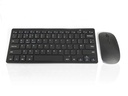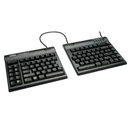
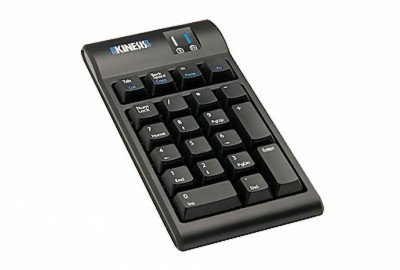
Kinesis Freestyle2 keypad
1
If you regularly use numeric keypads to enter large amounts of numeric data, Kinesis Freestyle Keyboard is the perfect and essential ergonomic accessory for you.
This separate keypad could help you be more productive by entering data fast, as well as it will help prevent computer-related repetitive strain injury or RSI.
Posture Tips & Improved Ergonomics
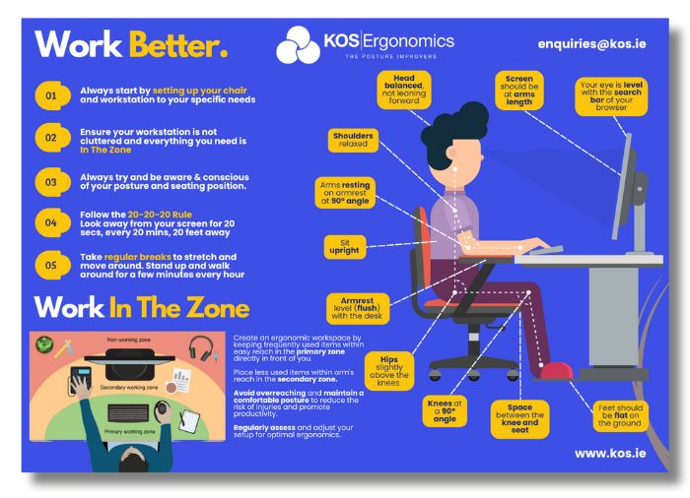
Sitting for long periods can often lead to discomfort or pain, especially in areas like your hips, lower back, and tailbone. Here are some simple, effective tips to help improve your posture and reduce common issues like hip pain when sitting, lower back pain when sitting, and tailbone pain when sitting.
1. Support Your Lower Back
If your lower back hurts when sitting, it's often due to a lack of proper support. Make sure your chair has good lumbar support to keep your spine aligned. You can also use a small cushion to provide extra support if needed.
2. Keep Your Hips at the Right Angle
When your hip hurts when sitting, it may be due to poor alignment. Your hips should be level with or slightly higher than your knees. Adjust your chair height so your feet are flat on the ground and your knees form a 90-degree angle. This can help reduce hip joint pain while sitting and prevent buttock pain when sitting and lying down.
3. Adjust Your Seat Position
For those dealing with coccyx pain when sitting or a sore tailbone from sitting, ensure your seat isn’t pressing too hard on your tailbone. Try a cushion with a cut-out section to relieve pressure on the tailbone and improve comfort.
4. Move Regularly
If you feel buttock ache when sitting or hip discomfort when sitting, it's a sign that your body needs a break. Stand up, stretch, or take a short walk every 30-60 minutes. Regular movement can ease tension and prevent hip ache when sitting or lower back pain while sitting.
5. Exercise for Strength and Flexibility
A good workout for back pain can strengthen your core and back muscles, reducing discomfort. Exercises like gentle stretches or yoga can help relieve bottom pain when sitting, butt pain while sitting, and improve overall posture.
By following these posture tips and incorporating ergonomic tips into your daily routine, you can reduce discomfort and improve your overall well-being while sitting. Make sure to listen to your body and adjust your workspace as needed to stay comfortable throughout the day.
Download Your FREE Posture Watch Poster!
Get Serious About Your Posture With This Helpful, Free Reminder!
If you regularly use numeric keypads to enter large amounts of numeric data, the Kinesis Freestyle Keyboard is the perfect and essential ergonomic accessory for you.
The Kinesis Freestyle Keyboard is part of the Kinesis Freestyle series that is designed to prevent office workplace injuries and illnesses.
The 10-key Freestyle2 Keypad can be placed in the most comfortable position – next to the computer mouse is the best position. It could also be placed on the left side of your keyboard, with your mouse sitting on the other side.
The Freestyle2 Keypad matches the low-profile design of the Freestyle2 keyboard and uses the same low-force, quiet and tactile membrane key switch.
The separate keypad allows flexibility in positioning to the right or left of the keyboard and are perfect for narrow keyboards like the Kinesis Freestyle2, and Maxim or in conjunction with your laptop. The 2-port USB hub enables you to easily connect other input devices such as mice without having to access USB ports on your computer.
Key Features:
- Integrated 2-port, 2.0 USB hub.
- Utilizes the same low-force, tactile membrane key switch as the Freestyle2 keyboard.
- Matches the low-profile design of the Freestyle2 keyboard.
- Embedded hot keys “Cut”, “Copy” & “Paste” for efficient editing.
Try Before You Buy
Not sure which setup is right for you? Visit our Dublin or Tipperary showrooms to test our full range of ergonomic office chairs, sit-stand desks, mice, keyboards, and accessories. You'll get free 1-1 ergonomic advice on the day from our experts to ensure you choose the equipment that works best for your body. Can't make it in person? Book a consultation via our online virtual studio.
Book Your Consultation Below
Dublin
Showroom

Tipperary
Showroom
Online
Virtual
Try Before You Buy
Not sure which setup is right for you? Visit our Dublin or Tipperary showrooms to test our full range of ergonomic office chairs, sit-stand desks, mice, keyboards, and accessories. You'll get free 1-1 ergonomic advice on the day from our experts to ensure you choose the equipment that works best for your body. Can't make it in person? Book a consultation via our online virtual studio.
Book Your Consultation Below
Dublin
Showroom
Tipperary
Showroom
Online
Virtual

To install this Web App in your iPhone/iPad press  and then Add to Home Screen.