

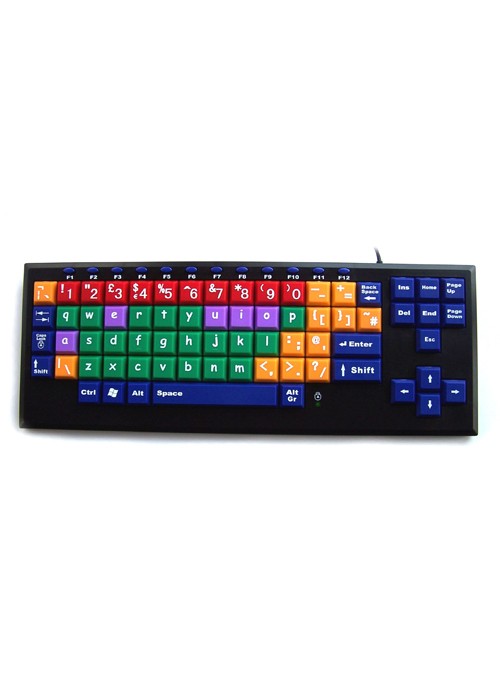
KOS Early Learning Keyboard - lower case
1
This early learning keyboard is easy to see and makes using the keyboard fun.
Lowercase children's keyboard with big keys, colour-coded for easy learning.
Posture Tips & Improved Ergonomics
Sitting for long periods can often lead to discomfort or pain, especially in areas like your hips, lower back, and tailbone. Here are some simple, effective tips to help improve your posture and reduce common issues like hip pain when sitting, lower back pain when sitting, and tailbone pain when sitting.
1. Support Your Lower Back
If your lower back hurts when sitting, it's often due to a lack of proper support. Make sure your chair has good lumbar support to keep your spine aligned. You can also use a small cushion to provide extra support if needed.
2. Keep Your Hips at the Right Angle
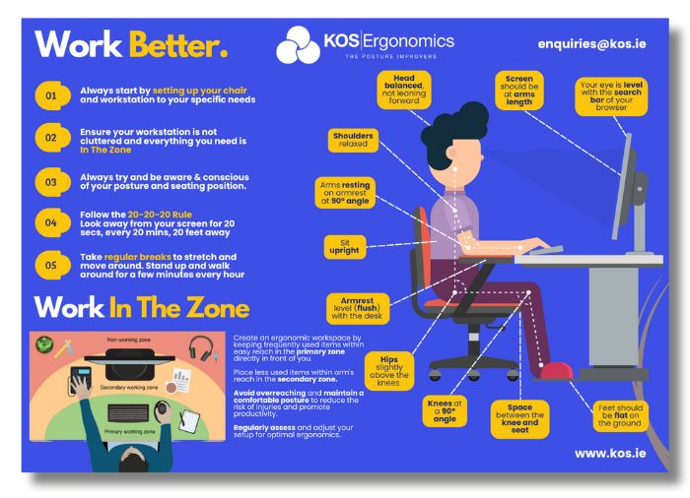
When your hip hurts when sitting, it may be due to poor alignment. Your hips should be level with or slightly higher than your knees. Adjust your chair height so your feet are flat on the ground and your knees form a 90-degree angle. This can help reduce hip joint pain while sitting and prevent buttock pain when sitting and lying down.
3. Adjust Your Seat Position
For those dealing with coccyx pain when sitting or a sore tailbone from sitting, ensure your seat isn’t pressing too hard on your tailbone. Try a cushion with a cut-out section to relieve pressure on the tailbone and improve comfort.
4. Move Regularly
If you feel buttock ache when sitting or hip discomfort when sitting, it's a sign that your body needs a break. Stand up, stretch, or take a short walk every 30-60 minutes. Regular movement can ease tension and prevent hip ache when sitting or lower back pain while sitting.
5. Exercise for Strength and Flexibility
A good workout for back pain can strengthen your core and back muscles, reducing discomfort. Exercises like gentle stretches or yoga can help relieve bottom pain when sitting, butt pain while sitting, and improve overall posture.
By following these posture tips and incorporating ergonomic tips into your daily routine, you can reduce discomfort and improve your overall well-being while sitting. Make sure to listen to your body and adjust your workspace as needed to stay comfortable throughout the day.
Download Your FREE Posture Watch Poster!
Get Serious About Your Posture With This Helpful, Free Reminder!
Key Features:
- This early-learning keyboard is designed to meet the educational needs of both children and adults.
- This keyboard has big keys which are brightly coloured and with a qwerty key layout. These large keys are up to 400% bigger than the standard keyboard.
- Its educational design helps to combat the use of upper-case letters which can be confusing for children who have not mastered the relationship between capital and lower-case letters' key layout.
- The keys are divided into colour-coded sections that help the child remember the location of the letters. It also encourages the recognition of vowels, consonants and punctuation marks.
- The large keys have extra-large letters on them, which make it easy to locate the different characters. Making it a useful addition to an assistive technology pack.
- The keyboard has USB connectivity and two extra USB ports so a keypad, mouse or joystick can be added.
Try Before You Buy
Not sure which setup is right for you? Visit our Dublin or Tipperary showrooms to test our full range of ergonomic office chairs, sit-stand desks, mice, keyboards, and accessories. You'll get free 1-1 ergonomic advice on the day from our experts to ensure you choose the equipment that works best for your body. Can't make it in person? Book a consultation via our online virtual studio.
Book Your Consultation Below
Dublin
Showroom

Tipperary
Showroom
Online
Virtual
Try Before You Buy
Not sure which setup is right for you? Visit our Dublin or Tipperary showrooms to test our full range of ergonomic office chairs, sit-stand desks, mice, keyboards, and accessories. You'll get free 1-1 ergonomic advice on the day from our experts to ensure you choose the equipment that works best for your body. Can't make it in person? Book a consultation via our online virtual studio.
Book Your Consultation Below
Dublin
Showroom
Tipperary
Showroom
Online
Virtual

To install this Web App in your iPhone/iPad press  and then Add to Home Screen.












