


Performing A DSE Compliant Remote Assessment | DSE Assessor Course
1
Become a Certified Internal DSE Assessor for Your Remote & Hybrid Workforce
In today’s hybrid working world, ensuring the health and safety of homeworkers is both a legal requirement and a unique challenge. KOS Ergonomics offers a specialized, half-day Remote DSE Assessor Course designed to equip you with the exact skills needed to conduct successful, legally compliant DSE (Display Screen Equipment) assessments for remote and hybrid staff.
This online course covers relevant Irish legislation, remote information-gathering techniques, and how to accurately guide remote workers through safe workstation setups, ensuring your company remains compliant while protecting employees from ergonomic risks.
Course Details & Structure
Format: Delivered entirely online
Duration: Half-Day Course (9:00 AM – 12:00 PM)
Certification: Fully Certified for 3 Years upon successful completion
Target Focus: Assessing Remote / Hybrid Staff and Homeworkers
Post-Course Support: Includes a Full Course Information Pack post-completion
Mentorship: Features a 90-minute 1-on-1 follow-up session
Guarantee: Complete after-care provided by the KOS Academy
Choose Your Preferred Date Below! (Click Configure) ↓

Key Features & Benefits
Master Remote Assessments: Learn to overcome the unique challenges of remote assessments compared to in-person ones. Gain practical techniques for remote information gathering, choosing the right communication technology, and providing virtual workstation guidance.
Legal Compliance & Risk Management: Receive a full, in-depth introduction to DSE legislation. Learn how to correctly identify hazards and high-risk employees working from home, ensuring your company avoids legal pitfalls.
Massive Cost Savings: Training an internal assessor drastically reduces the recurring costs of hiring external consultants for every new hire or homeworker setup.
Improve Health & Productivity: Proactively identify and fix workstation issues that cause physical stress, thereby reducing absenteeism, preventing injuries, and boosting overall employee productivity.
Expert-Led Training: Learn directly from fully accredited course lecturers boasting over 15 years of on-the-job experience and over 10,000 real-life assessments carried out.
Course Details & Structure
Format: Delivered entirely online
Duration: Half-Day Course (9:00 AM – 12:00 PM)
Certification: Fully Certified for 3 Years upon successful completion
Target Focus: Assessing Remote / Hybrid Staff and Homeworkers
Post-Course Support: Includes a Full Course Information Pack post-completion
Mentorship: Features a 90-minute 1-on-1 follow-up session
Guarantee: Complete after-care provided by the KOS Academy
Who Should Become A Remote DSE Assessor?
This comprehensive course is highly recommended for professionals responsible for staff welfare and compliance, including:
Health and Safety Managers / Personnel
Human Resource (HR) Managers
Occupational Health Professionals
Physiotherapists & Chiropractors
Office Managers
Business Owners
Nominated Employees / Designated Health & Safety Representatives
Frequently Asked Questions (FAQs)
Is it a legal requirement to assess homeworkers' DSE setups?
Yes. Under current Health and Safety legislation, employers have the same duty of care to employees working from home as they do to those in the office. This means regular DSE/VDU assessments are legally required for all homeworkers who use display screen equipment for significant parts of their day.
How is a remote DSE assessment different from an in-person one?
Remote assessments require a different skill set. Since you cannot physically see or adjust the employee's desk, you must rely on effective virtual communication, specific photo/video gathering techniques, and clear verbal guidance to help the employee correct their own posture and equipment layout. This course specifically teaches these remote techniques.
How long does the certification last?
Upon successfully completing this half-day online training, you will be a Fully Certified DSE Assessor. This certification is valid for 3 years, ensuring your skills and legal knowledge remain up to date.
What support do I get after the course finishes?
We do not just train you and leave you. KOS Ergonomics provides complete after-care through the KOS Academy. This includes a comprehensive Course Information Pack for your reference and a dedicated 90-minute 1-on-1 follow-up session to help you confidently execute your first assessments.
Do I need prior ergonomic experience to take this course?
Yes. To participate in this specialized remote assessment course, you must have already completed Level 1 DSE Assessor training (or an equivalent qualification) and have carried out a minimum of 25 practical assessments. This ensures you have the foundational ergonomic knowledge required before learning advanced remote techniques.
What Our Graduates Say
⭐⭐⭐⭐⭐ "A Must-Have for Hybrid Workplaces" "I completed the Level 1 course a while ago, but with half our company moving to a hybrid model, I felt completely out of my depth trying to assess their home setups over a webcam. This course was exactly what I needed. It taught me how to actually communicate the adjustments clearly when I can't be there to move the monitor myself. Highly recommend it to anyone managing hybrid teams!" — Sarah M., Office & Facilities Manager
⭐⭐⭐⭐⭐ "Exceptional Legal & Compliance Guidance" "As a Health and Safety Officer, ensuring our remote workers are compliant with HSA regulations is my top priority. This course brilliantly broke down the 2007 SHWW regulations as they apply to homeworking. The methodology for gathering pre-assessment information has saved me hours of administrative work. Fantastic course structure." — David T., Health & Safety Officer
⭐⭐⭐⭐⭐ "Brilliant Translation of Clinical Skills to the Virtual World" "I evaluate posture and biomechanics daily, but doing it through a screen requires a totally different approach. James is a fantastic trainer. The practical case studies and virtual 1-on-1 setup exercises gave me the exact framework I needed to confidently deliver remote ergonomic advice to my patients who are now working from home." — Emma R., Chartered Physiotherapist
Posture Tips & Improved Ergonomics
Sitting for long periods can often lead to discomfort or pain, especially in areas like your hips, lower back, and tailbone. Here are some simple, effective tips to help improve your posture and reduce common issues like hip pain when sitting, lower back pain when sitting, and tailbone pain when sitting.
1. Support Your Lower Back
If your lower back hurts when sitting, it's often due to a lack of proper support. Make sure your chair has good lumbar support to keep your spine aligned. You can also use a small cushion to provide extra support if needed.
2. Keep Your Hips at the Right Angle
When your hip hurts when sitting, it may be due to poor alignment. Your hips should be level with or slightly higher than your knees. Adjust your chair height so your feet are flat on the ground and your knees form a 90-degree angle. This can help reduce hip joint pain while sitting and prevent buttock pain when sitting and lying down.
3. Adjust Your Seat Position
For those dealing with coccyx pain when sitting or a sore tailbone from sitting, ensure your seat isn’t pressing too hard on your tailbone. Try a cushion with a cut-out section to relieve pressure on the tailbone and improve comfort.
4. Move Regularly
If you feel buttock ache when sitting or hip discomfort when sitting, it's a sign that your body needs a break. Stand up, stretch, or take a short walk every 30-60 minutes. Regular movement can ease tension and prevent hip ache when sitting or lower back pain while sitting.
5. Exercise for Strength and Flexibility
A good workout for back pain can strengthen your core and back muscles, reducing discomfort. Exercises like gentle stretches or yoga can help relieve bottom pain when sitting, butt pain while sitting, and improve overall posture.
By following these posture tips and incorporating ergonomic tips into your daily routine, you can reduce discomfort and improve your overall well-being while sitting. Make sure to listen to your body and adjust your workspace as needed to stay comfortable throughout the day.
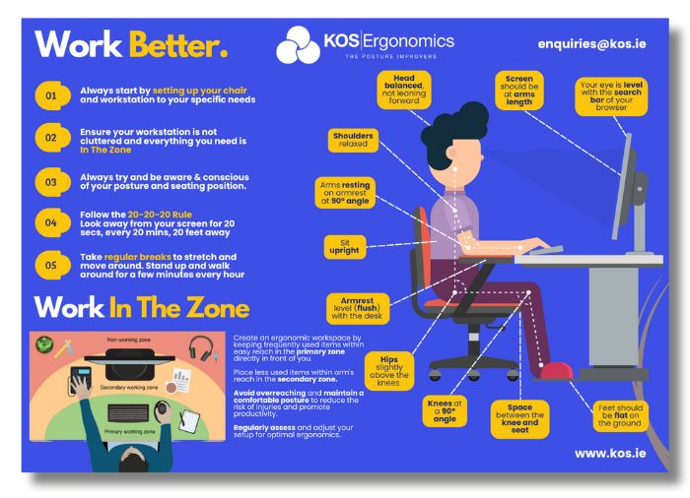
Download Your FREE Posture Watch Poster!
Get Serious About Your Posture With This Helpful, Free Reminder!
Key Features & Benefits
Master Remote Assessments: Learn to overcome the unique challenges of remote assessments compared to in-person ones. Gain practical techniques for remote information gathering, choosing the right communication technology, and providing virtual workstation guidance.
Legal Compliance & Risk Management: Receive a full, in-depth introduction to DSE legislation. Learn how to correctly identify hazards and high-risk employees working from home, ensuring your company avoids legal pitfalls.
Massive Cost Savings: Training an internal assessor drastically reduces the recurring costs of hiring external consultants for every new hire or homeworker setup.
Improve Health & Productivity: Proactively identify and fix workstation issues that cause physical stress, thereby reducing absenteeism, preventing injuries, and boosting overall employee productivity.
Expert-Led Training: Learn directly from fully accredited course lecturers boasting over 15 years of on-the-job experience and over 10,000 real-life assessments carried out.
Course Details & Structure
Format: Delivered entirely online
Duration: Half-Day Course (9:00 AM – 12:00 PM)
Certification: Fully Certified for 3 Years upon successful completion
Target Focus: Assessing Remote / Hybrid Staff and Homeworkers
Post-Course Support: Includes a Full Course Information Pack post-completion
Mentorship: Features a 90-minute 1-on-1 follow-up session
Guarantee: Complete after-care provided by the KOS Academy
Who Should Become A Remote DSE Assessor?
This comprehensive course is highly recommended for professionals responsible for staff welfare and compliance, including:
Health and Safety Managers / Personnel
Human Resource (HR) Managers
Occupational Health Professionals
Physiotherapists & Chiropractors
Office Managers
Business Owners
Nominated Employees / Designated Health & Safety Representatives
Frequently Asked Questions (FAQs)
Is it a legal requirement to assess homeworkers' DSE setups?
Yes. Under current Health and Safety legislation, employers have the same duty of care to employees working from home as they do to those in the office. This means regular DSE/VDU assessments are legally required for all homeworkers who use display screen equipment for significant parts of their day.
How is a remote DSE assessment different from an in-person one?
Remote assessments require a different skill set. Since you cannot physically see or adjust the employee's desk, you must rely on effective virtual communication, specific photo/video gathering techniques, and clear verbal guidance to help the employee correct their own posture and equipment layout. This course specifically teaches these remote techniques.
How long does the certification last?
Upon successfully completing this half-day online training, you will be a Fully Certified DSE Assessor. This certification is valid for 3 years, ensuring your skills and legal knowledge remain up to date.
What support do I get after the course finishes?
We do not just train you and leave you. KOS Ergonomics provides complete after-care through the KOS Academy. This includes a comprehensive Course Information Pack for your reference and a dedicated 90-minute 1-on-1 follow-up session to help you confidently execute your first assessments.
Do I need prior ergonomic experience to take this course?
Yes. To participate in this specialized remote assessment course, you must have already completed Level 1 DSE Assessor training (or an equivalent qualification) and have carried out a minimum of 25 practical assessments. This ensures you have the foundational ergonomic knowledge required before learning advanced remote techniques.
What Our Graduates Say
⭐⭐⭐⭐⭐ "A Must-Have for Hybrid Workplaces" "I completed the Level 1 course a while ago, but with half our company moving to a hybrid model, I felt completely out of my depth trying to assess their home setups over a webcam. This course was exactly what I needed. It taught me how to actually communicate the adjustments clearly when I can't be there to move the monitor myself. Highly recommend it to anyone managing hybrid teams!" — Sarah M., Office & Facilities Manager
⭐⭐⭐⭐⭐ "Exceptional Legal & Compliance Guidance" "As a Health and Safety Officer, ensuring our remote workers are compliant with HSA regulations is my top priority. This course brilliantly broke down the 2007 SHWW regulations as they apply to homeworking. The methodology for gathering pre-assessment information has saved me hours of administrative work. Fantastic course structure." — David T., Health & Safety Officer
⭐⭐⭐⭐⭐ "Brilliant Translation of Clinical Skills to the Virtual World" "I evaluate posture and biomechanics daily, but doing it through a screen requires a totally different approach. James is a fantastic trainer. The practical case studies and virtual 1-on-1 setup exercises gave me the exact framework I needed to confidently deliver remote ergonomic advice to my patients who are now working from home." — Emma R., Chartered Physiotherapist
Alternative Products

Online Level 1 DSE & VDU Course | Beginner
Online Level 2 DSE Assessor Course | Advanced/Refresher
Try Before You Buy
Not sure which setup is right for you? Visit our Dublin or Tipperary showrooms to test our full range of ergonomic office chairs, sit-stand desks, mice, keyboards, and accessories. You'll get free 1-1 ergonomic advice on the day from our experts to ensure you choose the equipment that works best for your body. Can't make it in person? Book a consultation via our online virtual studio.
Book Your Consultation Below
Dublin
Showroom

Tipperary
Showroom

Online
Virtual
Try Before You Buy
Not sure which setup is right for you? Visit our Dublin or Tipperary showrooms to test our full range of ergonomic office chairs, sit-stand desks, mice, keyboards, and accessories. You'll get free 1-1 ergonomic advice on the day from our experts to ensure you choose the equipment that works best for your body. Can't make it in person? Book a consultation via our online virtual studio.
Book Your Consultation Below
Dublin
Showroom
Tipperary
Showroom
Online
Virtual

To install this Web App in your iPhone/iPad press  and then Add to Home Screen.












